If you want to set your number to be n-decimal-point number, you can use toFixed(n) function. I fount this methos in http://www.mredkj.com/javascript/nfbasic2.html For example,
[Java Script]
//Input: 1234 or 123.4
//Output: 1234.00 or 123.40
yourNumber = num.toFixed(2);

Tuesday, February 3, 2009


Let's Talk about .. MOSS2007-Install SQL Server Reporting Services Add-in
Today I just updated version of SQL Server Reporting Services Add-in for SharePoint Technologies
The instruction to install the SQL Server Reporting Services Add-in
-Make sure you already installed Service Pack 3 of SQL Server 2005
-First I downloaded the add-in from
http://www.microsoft.com/downloads/details.aspx?FamilyID=0acb75a6-7c1d-4e2b-af69-7e5f9ecad299&displaylang=en).
-Run SharePoint Products and technologies Configuration Wizard
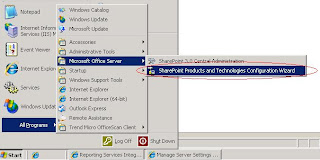
(Start->All Programs->Microsoft Office Server->SharePoint Products and Technologies Configuration Wizard)
-Enter Central Administrator
-Go to Application Management tab
-Go to Reporting Services->Manage integration settings
-Set Report Server Web Service URL
-Set the Authentication Mode, for me, I selected Trusted Account
-Click OK button
-Go to Reporting Services->Grant database access
-Specify Server Name and name instance, if any
-Click OK button
-Go to Reporting Services->Set server defaults
-If anything is ok, you should be able to see the detail of this page
The instruction to install the SQL Server Reporting Services Add-in
-Make sure you already installed Service Pack 3 of SQL Server 2005
-First I downloaded the add-in from
http://www.microsoft.com/downloads/details.aspx?FamilyID=0acb75a6-7c1d-4e2b-af69-7e5f9ecad299&displaylang=en).
NOTE: Check whether your MOSS runs on 32 or 64 bit server
-Install it
-RestartIIS-Run SharePoint Products and technologies Configuration Wizard
(Start->All Programs->Microsoft Office Server->SharePoint Products and Technologies Configuration Wizard)
-Enter Central Administrator
-Go to Application Management tab
-Go to Reporting Services->Manage integration settings
-Set Report Server Web Service URL
-Set the Authentication Mode, for me, I selected Trusted Account
-Click OK button
-Go to Reporting Services->Grant database access
-Specify Server Name and name instance, if any
-Click OK button
-Go to Reporting Services->Set server defaults
-If anything is ok, you should be able to see the detail of this page
Thursday, January 29, 2009
Let's Talk about .. Visual Studio 2005-Web Services Enhancements 3.0
Today I participated a mini course of Web Services Enhancements (WSE) 3.0, instructed by Dr. Gorn Tepvorachai and Mr.Suppakrit Forbes Chatchayanusorn from Standards & Methodology Team, IT Department, BOT.
Since I have to develop the web services that return some credential results, WSE 3.0 is the solution they suggested me.
The basic concept of WSE 3.0 is there is a connection between web site and web service that makes it unable to be called directly via URL.
The instruction to Declare Security and Policy by WSE 3.0
-Check Your Web Service comes from New Web Site->ASP.NET Web Service
-Install WSE 3.0
-Open Solution of VS2005
- Check out the project of Web Service
-Right click at the project of Web Service
-Click WSE Settings 3.0 (at the buttom)
-In General tab, check Enable the project for Web Services Enhancements
-Check Enable Microsoft Web Services Enhancements Soap Protocol Factory
-In Diasnostics tab, Check Enable Message Trace
-Click OK button
-Check your web.config, is it added section tag with microsoft.web.services3
-Deploy your Web Service
-Try to call your web service via web browser (optional)
At WebSite:
-Check your Web Site project
-Right Click at WebSite project
-Click at WSE Settings 3.0
-In General tab, check Enable the project for Web Services Enhancement
-Update your web service
-Rebuild your project
-Test that your web is still able to call your web service
- If ok, now it's a step to set the policy.
At WebService Side:
-Right click at web service project
-Click at WSE Settings 3.0
-In Policy tab, check Enable Policy
-Click Add button
-Type your Policy Name
-Click OK
-Click Next
-Do you want to secure a service or a client?, Select Secure a service application
-Choose Client Authentication Method, for me I choose Username
-Click Next
-Click Next
-Uncheck Establish Secure Session
-Click Next
-Click Select Certificate button, if any
-Click Next
-The summary message appears, click Finish
-Now you will get [yourPolycy]Cache.config file
-Open your dot vb file of Web Service
-Under WebServiceBinding tag, add Policy tag => //Policy("YourPolicyName")> _
At WebSite:
-Right click at you project
-Click at WSE Settings 3.0
-In Policy tab, enable policy
-Add Policy
-Click OK button
-Click Next button
-Select Secure a client application
-Select authentication mode, for me I use username
-Click Next button
-Enable Perform Authorization
-Add User or Add Role
Note: if you want to use the local user or local group as the role you can see the instruction at
http://natttech.blogspot.com/2009/02/lets-talk-about-windows-server-2003.html
-Uncheck the Establish Secure Session
-Click Next button
-Select Certificate, if any
-Click Finish button
-Click OK button
-Open you dot vb file that call the Web Service
-Modify it, for example, this is my old one before modification,
[VB.Net]
Dim ServiceGetResult As New MyWeb.Business.GetResult.NATTService
change to
[VB.Net]
Dim ServiceGetResult As New MyWeb.Business.GetResult.NATTService
ServiceGetResult.SetClientCredential(Of UsernameToken)(New UsernameToken("NATTusername", "NATTpassword", PasswordOption.SendHashed))
'NATTusername and NATTpassword are your username and password.
ServiceGetResult.SetPolicy("NATT Client Policy")
'NATT Client Policy is my WebSite Policy name.
hidResult.Value = ServiceGetResult.GetResultByID(txtID.Text)
At Web Service:
Because I want to check the role of user/Web Site that call the method of my web service, so I have to add the authorize function to my web service code.
-Open your dot vb file of your web service
-Add imports System.Security.Principal
-Add imports Microsoft.Web.Services3.Security.Tokens
-Add Authorization() function
[VB.Net]
Private Sub Authorization(ByVal inputRole As String)
Dim pPrincipal As IPrincipal = RequestSoapContext.Current.Credentials.UltimateReceiver.GetClientToken(Of UsernameToken)().Principal
If Not pPrincipal Is Nothing And p.IsInRole(role) Then
Return
Else
Throw New SoapException("Access denied.", New XmlQualifiedName("Authorization"))
End If
End Sub
-Add Authorization("YourRoleName") inside your method before doing anything
Note that YourRoleName is the username or role name that you specified in WSE setting.
-Deploy your web service
At WebSite:
-Update your Web Service
Now only the user or member of role group that you specified will be juct a group that can use that method of your web service.
Since I have to develop the web services that return some credential results, WSE 3.0 is the solution they suggested me.
The basic concept of WSE 3.0 is there is a connection between web site and web service that makes it unable to be called directly via URL.
The instruction to Declare Security and Policy by WSE 3.0
NOTE: Make sure that you already installed WSE3.0 (runtime) to your server both WebSite and Web Service and WSE3.0 (Visual Studio Developer) on your developing machine.
At WebService Side:
-Check Your Web Service comes from New Web Site->ASP.NET Web Service
-Install WSE 3.0
-Open Solution of VS2005
- Check out the project of Web Service
-Right click at the project of Web Service
-Click WSE Settings 3.0 (at the buttom)
-In General tab, check Enable the project for Web Services Enhancements
-Check Enable Microsoft Web Services Enhancements Soap Protocol Factory
-In Diasnostics tab, Check Enable Message Trace
-Click OK button
-Check your web.config, is it added section tag with microsoft.web.services3
-Deploy your Web Service
-Try to call your web service via web browser (optional)
At WebSite:
-Check your Web Site project
-Right Click at WebSite project
-Click at WSE Settings 3.0
-In General tab, check Enable the project for Web Services Enhancement
-Update your web service
-Rebuild your project
-Test that your web is still able to call your web service
- If ok, now it's a step to set the policy.
At WebService Side:
-Right click at web service project
-Click at WSE Settings 3.0
-In Policy tab, check Enable Policy
-Click Add button
-Type your Policy Name
-Click OK
-Click Next
-Do you want to secure a service or a client?, Select Secure a service application
-Choose Client Authentication Method, for me I choose Username
-Click Next
-Click Next
-Uncheck Establish Secure Session
-Click Next
-Click Select Certificate button, if any
-Click Next
-The summary message appears, click Finish
-Now you will get [yourPolycy]Cache.config file
-Open your dot vb file of Web Service
-Under WebServiceBinding tag, add Policy tag => //Policy("YourPolicyName")> _
At WebSite:
-Right click at you project
-Click at WSE Settings 3.0
-In Policy tab, enable policy
-Add Policy
-Click OK button
-Click Next button
-Select Secure a client application
-Select authentication mode, for me I use username
-Click Next button
-Enable Perform Authorization
-Add User or Add Role
Note: if you want to use the local user or local group as the role you can see the instruction at
http://natttech.blogspot.com/2009/02/lets-talk-about-windows-server-2003.html
-Uncheck the Establish Secure Session
-Click Next button
-Select Certificate, if any
-Click Finish button
-Click OK button
-Open you dot vb file that call the Web Service
-Modify it, for example, this is my old one before modification,
[VB.Net]
Dim ServiceGetResult As New MyWeb.Business.GetResult.NATTService
change to
[VB.Net]
Dim ServiceGetResult As New MyWeb.Business.GetResult.NATTService
ServiceGetResult.SetClientCredential(Of UsernameToken)(New UsernameToken("NATTusername", "NATTpassword", PasswordOption.SendHashed))
'NATTusername and NATTpassword are your username and password.
ServiceGetResult.SetPolicy("NATT Client Policy")
'NATT Client Policy is my WebSite Policy name.
hidResult.Value = ServiceGetResult.GetResultByID(txtID.Text)
At Web Service:
Because I want to check the role of user/Web Site that call the method of my web service, so I have to add the authorize function to my web service code.
-Open your dot vb file of your web service
-Add imports System.Security.Principal
-Add imports Microsoft.Web.Services3.Security.Tokens
-Add Authorization() function
[VB.Net]
Private Sub Authorization(ByVal inputRole As String)
Dim pPrincipal As IPrincipal = RequestSoapContext.Current.Credentials.UltimateReceiver.GetClientToken(Of UsernameToken)().Principal
If Not pPrincipal Is Nothing And p.IsInRole(role) Then
Return
Else
Throw New SoapException("Access denied.", New XmlQualifiedName("Authorization"))
End If
End Sub
-Add Authorization("YourRoleName") inside your method before doing anything
Note that YourRoleName is the username or role name that you specified in WSE setting.
-Deploy your web service
At WebSite:
-Update your Web Service
Now only the user or member of role group that you specified will be juct a group that can use that method of your web service.
Monday, January 26, 2009
Let's Talk about .. Visual Studio 2005-Bind DropDownList when another DropDownList changed in Repeater
P'Beer teached me last week about how to create the drop down list B that will be binded only when drop down list A's index is changed, for the case that A and B are drop down lists in the repeater.
The Instruction to Bind DropDownList when another DropDownList changed in Repeater
-add these tags for AJAX Update Panel
[HTML]
//asp:ScriptManager ID="ScriptManager1" runat="server">
/ /asp:ScriptManager>
//asp:UpdatePanel ID="UpdatePanel1" runat="server">
"
[..your table/tr/td..]
// /ContentTemplate>
// /asp:UpdatePanel>
-Add drop down list tags
[HTML]
Drop Down List A
Drop Down List B
-In the code behind, in Sub of Repeater_ItemDataBound, bind the drop down list A by adding the following lines.
[VB.Net]
If e.Item.DataItem.A_Code <> "" Or e.Item.DataItem.A_Code IsNot Nothing Then
ddlA.SelectedValue = e.Item.DataItem.A_Code
Else
'Bind DropDownList A
ddlA.DataTextField = "Ar_Name"
ddlA.DataValueField = "A_Code"
ddlA.DataSource = (New [YourNameSpace].[YourEntity].[ABus]).GetAll_ListA()
ddlA.DataBind()
ddlA.Items.Insert(0, "") 'if you don't wanna show the first choice.
End If
-Add the event for drop down list A's seelcted index changed.
[VB.Net]
#Region " DropDown Event "
Public Sub ddlA_SelectedIndexChanged(ByVal Sender As Object, ByVal e As System.EventArgs)
Dim x As String = CType(Sender, DropDownList).ClientID
For i As Integer = 0 To Me.repMain.Items.Count - 1
Dim ddlA As DropDownList = Me.repMain.Items(i).FindControl("ddlA")
If ddlA.ClientID = x Then
Dim ddlB As DropDownList = Me.repMain.Items(i).FindControl("ddlB")
'Bind DropDownList B
ddlB.DataTextField = "B_Name"
ddlB.DataValueField = "B_Code"
ddlB.DataSource = (New [YourNameSapce].[YourEntity].[YourBus]).Get_List_B_By_A_Code(ddlA.SelectedValue)
ddlB.DataBind()
End If
Next
End Sub
#End Region
The Instruction to Bind DropDownList when another DropDownList changed in Repeater
-add these tags for AJAX Update Panel
[HTML]
//asp:ScriptManager ID="ScriptManager1" runat="server">
/ /asp:ScriptManager>
//asp:UpdatePanel ID="UpdatePanel1" runat="server">
"
[..your table/tr/td..]
// /ContentTemplate>
// /asp:UpdatePanel>
-Add drop down list tags
[HTML]
Drop Down List A
Drop Down List B
-In the code behind, in Sub of Repeater_ItemDataBound, bind the drop down list A by adding the following lines.
[VB.Net]
If e.Item.DataItem.A_Code <> "" Or e.Item.DataItem.A_Code IsNot Nothing Then
ddlA.SelectedValue = e.Item.DataItem.A_Code
Else
'Bind DropDownList A
ddlA.DataTextField = "Ar_Name"
ddlA.DataValueField = "A_Code"
ddlA.DataSource = (New [YourNameSpace].[YourEntity].[ABus]).GetAll_ListA()
ddlA.DataBind()
ddlA.Items.Insert(0, "") 'if you don't wanna show the first choice.
End If
-Add the event for drop down list A's seelcted index changed.
[VB.Net]
#Region " DropDown Event "
Public Sub ddlA_SelectedIndexChanged(ByVal Sender As Object, ByVal e As System.EventArgs)
Dim x As String = CType(Sender, DropDownList).ClientID
For i As Integer = 0 To Me.repMain.Items.Count - 1
Dim ddlA As DropDownList = Me.repMain.Items(i).FindControl("ddlA")
If ddlA.ClientID = x Then
Dim ddlB As DropDownList = Me.repMain.Items(i).FindControl("ddlB")
'Bind DropDownList B
ddlB.DataTextField = "B_Name"
ddlB.DataValueField = "B_Code"
ddlB.DataSource = (New [YourNameSapce].[YourEntity].[YourBus]).Get_List_B_By_A_Code(ddlA.SelectedValue)
ddlB.DataBind()
End If
Next
End Sub
#End Region
Sunday, January 25, 2009
Let's Talk about .. Windows Server 2003-Start MS Single Sign-On Service
There are 2 methods to start Single Sign-On services for windows server 2003. The first method P'Pop bot-it told me and the second one I found it from http://hilfiger1014.spaces.live.com/Blog/cns!B5605D7C2A738C3D!498.entry
The instruction to start MS Single Sign-On Service
The First Method:
-Go to Start->All Programs->Administrative Tools->Services
-Right click at Microsoft Single Sign-On Service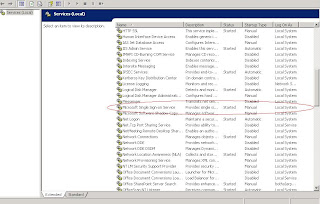
-Click Start
The Second Method:
-Go to Command Line
-Type "net start ssosrv"
Saturday, January 10, 2009
Let's Talk about .. MOSS2007-Backup & Restore Site Collection
The best practical way to backup and restore site collection is using the command line. We use stsadm command for both backup and restore. To backup the site collection into .dat file, we use stsadm.exe -o backup -url [your Site Collection url] -filename [Backup filename with location url] For example,
[cmd]
"C:\Program Files\Common Files\Microsoft Shared\Web Server Extensions\12\BIN\"stsadm.exe -o backup -url http://NATTServer/sites/NattSite -filename f:\backup\nattsite.dat
And we use stsadm.exe -o restore -url [your Site Collection url] -filename [Backup filename with location] For example,
[cmd]
"C:\Program Files\Common Files\Microsoft Shared\Web Server Extensions\12\BIN\"stsadm.exe -o restore -url http://NATTServer/sites/NattSite -filename F:\backup\nattsite.dat
Note: we can backup site collection from one server to restore it at another site collection.
Moreover, we can add -overwrite to both -backup and -restore command, however, it's not recommended to overwrite the site collection when you restore it since some incorrect things may occur. It's the suggestion from P'Chatree from Microsoft. Thus, you should delete site collection before restoring the site collection.
The instruction to delete site collection
-Enter Central Administration
-Click Application Management tab
-Click SharePoint Site Management->Delete site collection
 -Click at No selection
-Click Change Site Collection
 -Select the site collection you wanna delete
-Click OK button
-Click Delete button
-Click OK button to confirm to delete
[cmd]
"C:\Program Files\Common Files\Microsoft Shared\Web Server Extensions\12\BIN\"stsadm.exe -o backup -url http://NATTServer/sites/NattSite -filename f:\backup\nattsite.dat
And we use stsadm.exe -o restore -url [your Site Collection url] -filename [Backup filename with location] For example,
[cmd]
"C:\Program Files\Common Files\Microsoft Shared\Web Server Extensions\12\BIN\"stsadm.exe -o restore -url http://NATTServer/sites/NattSite -filename F:\backup\nattsite.dat
Note: we can backup site collection from one server to restore it at another site collection.
Moreover, we can add -overwrite to both -backup and -restore command, however, it's not recommended to overwrite the site collection when you restore it since some incorrect things may occur. It's the suggestion from P'Chatree from Microsoft. Thus, you should delete site collection before restoring the site collection.
The instruction to delete site collection
-Enter Central Administration
-Click Application Management tab
-Click SharePoint Site Management->Delete site collection
-Click at No selection-Click Change Site Collection
-Select the site collection you wanna delete-Click OK button
-Click Delete button
-Click OK button to confirm to delete
Let's Talk about .. Visual Studio 2005-Change XML Node to DataSet
Yesterday, P'Tarn guided me how to change the XML Node to DataSet. Anyway, this way is for only the case of fixed node(s).
[VB.Net]
Dim retXmlNode As XmlNode
retXmlNode = objOutInfo.WebServiceGetInfo(InputData)
Dim retDataSet As New DataSet()
row = retTab.NewRow()
'Check that node1 for row1 is exist.
If Not (retXmlNode.SelectSingleNode("/EntityName/NodeName1") Is Nothing) Then
row("RowNameOfDataSet1") = retXmlNode.SelectSingleNode("/EntityName/NodeName1").InnerXml
End If
'Check that node2 for row2 is exist.
If Not (retXmlNode.SelectSingleNode("/EntityName/NodeName2") Is Nothing) Then
row("RowNameOfDataSet2") = retXmlNode.SelectSingleNode("/EntityName/NodeName2").InnerXml
End If
retTab.Rows.Add(row)
retDataSet.Tables.Add(retTab)
'Now you can do .. return retDataSet
[VB.Net]
Dim retXmlNode As XmlNode
retXmlNode = objOutInfo.WebServiceGetInfo(InputData)
Dim retDataSet As New DataSet()
row = retTab.NewRow()
'Check that node1 for row1 is exist.
If Not (retXmlNode.SelectSingleNode("/EntityName/NodeName1") Is Nothing) Then
row("RowNameOfDataSet1") = retXmlNode.SelectSingleNode("/EntityName/NodeName1").InnerXml
End If
'Check that node2 for row2 is exist.
If Not (retXmlNode.SelectSingleNode("/EntityName/NodeName2") Is Nothing) Then
row("RowNameOfDataSet2") = retXmlNode.SelectSingleNode("/EntityName/NodeName2").InnerXml
End If
retTab.Rows.Add(row)
retDataSet.Tables.Add(retTab)
'Now you can do .. return retDataSet
Subscribe to:
Posts (Atom)