Last Thursday, I participated the meeting of MS SQL Server 2008 Presentation by Mr.Nicolas and Mr.Jason , engineers from Microsoft.
Because my office member have started using Reporting Services in our systems, thus we would like to discuss about it and the problems we found.
The first one they suggested is "Scale Out". They recommended us to use many report servers to point to the report catalog.
The important one they suggested us to use was Report Catalog. The Report Catalog consists of Reporting Services Database (RSDB) and Reporting Services Tempolary Database (RSTempDB). It has a lot of I/O of transaction.
1.RSDB stores the report's metadata, including snapshots. It is long living, thus it should be backed up.
2.RSTempDB stores tempolary snapshot while running reports. It is highly volatile. And since its volatile, we need the report lifetime policy of data by setting session timeout value (10 min): Clean up Cycle Minutes guides background clean up thread.
Then, how different between RS2005 and RS2008.
For RS2005,
-Many insert to Chunk Data
-Many insert to Snapshot Data
-Many insert to Session Data Table
For RS2008,
-Many insert to Segment; take majority of transation of RSTempDB
Some trip to optimize the Report Performance
-Remove the unnecessary columns
-Bring rendered report to user, for example, doc, pdf, etc.
They showed us the new tool, MS SQL Server 2008 Report Builder. It looks like MS Office 2007 Application because of its theme. In the future, users can design and use the reports themselves. I asked them if there are any features that we still need Visual Studio 2008 to develop the report. They answered me that the Report Builder can do anything VS2008 can except debugging and creating and using several data sources.

Showing posts with label SQL Server 2005. Show all posts
Showing posts with label SQL Server 2005. Show all posts
Sunday, March 15, 2009


Tuesday, February 3, 2009
Let's Talk about .. MOSS2007-Install SQL Server Reporting Services Add-in
Today I just updated version of SQL Server Reporting Services Add-in for SharePoint Technologies
The instruction to install the SQL Server Reporting Services Add-in
-Make sure you already installed Service Pack 3 of SQL Server 2005
-First I downloaded the add-in from
http://www.microsoft.com/downloads/details.aspx?FamilyID=0acb75a6-7c1d-4e2b-af69-7e5f9ecad299&displaylang=en).
-Run SharePoint Products and technologies Configuration Wizard
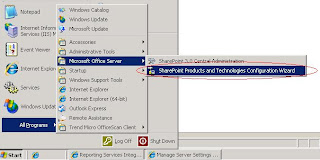
(Start->All Programs->Microsoft Office Server->SharePoint Products and Technologies Configuration Wizard)
-Enter Central Administrator
-Go to Application Management tab
-Go to Reporting Services->Manage integration settings
-Set Report Server Web Service URL
-Set the Authentication Mode, for me, I selected Trusted Account
-Click OK button
-Go to Reporting Services->Grant database access
-Specify Server Name and name instance, if any
-Click OK button
-Go to Reporting Services->Set server defaults
-If anything is ok, you should be able to see the detail of this page
The instruction to install the SQL Server Reporting Services Add-in
-Make sure you already installed Service Pack 3 of SQL Server 2005
-First I downloaded the add-in from
http://www.microsoft.com/downloads/details.aspx?FamilyID=0acb75a6-7c1d-4e2b-af69-7e5f9ecad299&displaylang=en).
NOTE: Check whether your MOSS runs on 32 or 64 bit server
-Install it
-RestartIIS-Run SharePoint Products and technologies Configuration Wizard
(Start->All Programs->Microsoft Office Server->SharePoint Products and Technologies Configuration Wizard)
-Enter Central Administrator
-Go to Application Management tab
-Go to Reporting Services->Manage integration settings
-Set Report Server Web Service URL
-Set the Authentication Mode, for me, I selected Trusted Account
-Click OK button
-Go to Reporting Services->Grant database access
-Specify Server Name and name instance, if any
-Click OK button
-Go to Reporting Services->Set server defaults
-If anything is ok, you should be able to see the detail of this page
Wednesday, October 8, 2008
Let's Talk about .. Visual Studio 2005-Reporting Services: Show 0.00 format
P'Kaew told me how my report in reporting services shows the format number of 0.00 (decimal point)

The instruction to show 0.00
-Right Click at the cell
-Click Properties
-In Format tab, set Format code: N

The instruction to show 0.00
-Right Click at the cell
-Click Properties
-In Format tab, set Format code: N
Wednesday, September 24, 2008
Let's Talk about .. SQL Server 2005-How to convert datetime to date string
Since type Datetime in SQL Server 2005 consists of both date and time, thus sometimes when we want only date we need to do something. This is one of the ways to convert datetime.
[SQL]
CONVERT(varchar, CONVERT(datetime, convert (datetime, convert (varchar, datecol, 101), 101) ), 100)
[SQL]
CONVERT(varchar, CONVERT(datetime, convert (datetime, convert (varchar, datecol, 101), 101) ), 100)
Monday, September 22, 2008
Let's Talk about .. Visual Stuido 2005-Error The timeout period elapsed prior to obtaining a connection from the pool
“Timeout expired. The timeout period elapsed prior to obtaining a connection from the pool. This may have occurred because all pooled connections were in use and max pool size was reached. “
P'Beer told me that this problem is normally the result of our forgotten coding. We usually use SQLHelper to connect to the database. Inside SQLHelper, there are many methods. We often use ExecuteReader and forget to close the connection. This method doesn't automatically close the connection, because it returns object as SqlDataReader which has to open the connection while it's reading. Thus we have to close by ourselves, otherwise, the connections will stuck inside the pool til max pool size. In fact, dot net provides a garbage collector to collect the unused connections, however, we may have to wait for an hour. Therefore, the best way to do is closing connection everytime we finish execute reading.
[VB.Net]
Dim dr as SqlDataReader = SqlHelper.ExecuteReader(ConnectionString, CommandType.StoredProcedure, ”StroreProcedureName”, SqlParameter())
If dr.Read() Then
‘Do something
End If
dr.close()
As you see, we don't close the connection directly, but SqlDataReader instead since by colsing SqlDataReader, it closes the connection automatically.
Special Thanks to P'Beer Adisorn for this knowledge.
P'Beer told me that this problem is normally the result of our forgotten coding. We usually use SQLHelper to connect to the database. Inside SQLHelper, there are many methods. We often use ExecuteReader and forget to close the connection. This method doesn't automatically close the connection, because it returns object as SqlDataReader which has to open the connection while it's reading. Thus we have to close by ourselves, otherwise, the connections will stuck inside the pool til max pool size. In fact, dot net provides a garbage collector to collect the unused connections, however, we may have to wait for an hour. Therefore, the best way to do is closing connection everytime we finish execute reading.
[VB.Net]
Dim dr as SqlDataReader = SqlHelper.ExecuteReader(ConnectionString, CommandType.StoredProcedure, ”StroreProcedureName”, SqlParameter())
If dr.Read() Then
‘Do something
End If
dr.close()
As you see, we don't close the connection directly, but SqlDataReader instead since by colsing SqlDataReader, it closes the connection automatically.
Special Thanks to P'Beer Adisorn for this knowledge.
Monday, July 21, 2008
Let's Talk about .. SQL 2005-Summation
The syntax to sum column A and B to be Summation is
[SQL]
Select sum (A+B) As Summation
,C
Group By A,B,C
[SQL]
Select sum (A+B) As Summation
,C
Group By A,B,C
Tuesday, July 8, 2008
Let's Talk about .. SQL Server 2005-Cast variable type
This is a way to cast the type of variable from String to Decimal
[SQL]
Declare @CurrentYear as varchar(4)
set @CurrentYear = Cast(@NextYear as decimal(18,3))-1
[SQL]
Declare @CurrentYear as varchar(4)
set @CurrentYear = Cast(@NextYear as decimal(18,3))-1
Thursday, July 3, 2008
Let's Talk about .. SQL Server 2005-Case..When
Today P'Tao told me how to use case and when in SQL. This is the example.
[SQL]
SELECT Product_ID
, Sample =
CASE Word
WHEN 'A' THEN 'Apple'
WHEN 'B' THEN 'Banana'
WHEN 'C' THEN 'Coconut'
ELSE 'Panda' END
, Description
FROM Production.Product
[SQL]
SELECT Product_ID
, Sample =
CASE Word
WHEN 'A' THEN 'Apple'
WHEN 'B' THEN 'Banana'
WHEN 'C' THEN 'Coconut'
ELSE 'Panda' END
, Description
FROM Production.Product
Monday, June 16, 2008
Let's Talk about .. SQL Server 2005-Count the number of items from many sets of select
P'Beer told me yesterday about how to find out the number of all items (from many selects). This is the solution.
[SQL]
select count(*)
from(select .......)
UNION(select .......) Table_Name
Note: you've to specify the Name (Table_Name) after the last select.
[SQL]
select count(*)
from(select .......)
UNION(select .......) Table_Name
Note: you've to specify the Name (Table_Name) after the last select.
Monday, June 9, 2008
Let's Talk about .. SQL Server 2005-Manage Transaction
When your stored procedure is running, what happen if something accidentally occurs? Your update procedure may just copy only some fields of some records.. then stop. Thus, we should manage the transaction for every neccessary stored procedure such as Add, Update, Delete, etc.
This is the example of managing transaction that I found from http://www.4guysfromrolla.com/webtech/080305-1.shtml
[SQL]
BEGIN TRANSACTION
[your process]
IF @@ERROR <> 0
BEGIN
ROLLBACK
RETURN
END
COMMIT
This is the example of managing transaction that I found from http://www.4guysfromrolla.com/webtech/080305-1.shtml
[SQL]
BEGIN TRANSACTION
[your process]
IF @@ERROR <> 0
BEGIN
ROLLBACK
RETURN
END
COMMIT
Thursday, May 29, 2008
Let's Talk about .. SQL Server 2005-Convert AD to BD
I found the way to convert the AD to BD in the SQL query from http://www.narisa.com/forums/index.php?act=Print&client=printer&f=22&t=21017
[SQL]
convert(varchar(4), year(AD_Date) + 543)
+ '-' +
convert(varchar(2),month(AD_Date))
+ '-' +
convert(varchar(2), day(AD_Date))
as BD_Date,
[SQL]
convert(varchar(4), year(AD_Date) + 543)
+ '-' +
convert(varchar(2),month(AD_Date))
+ '-' +
convert(varchar(2), day(AD_Date))
as BD_Date,
Friday, May 23, 2008
Let's Talk about .. Visual Stuido 2005-Function Get DataTable or variable from SQL2005 Stored Procedure
[VB.Net]
Public Shared Function GetDataTableByValueAAndValueB(ByVal ValueA As String, ByVal ValueB As String) As DataTable
Dim ds As New DataSet
Dim SqlParam As SqlParameter() = Nothing
addParameter(SqlParam, "@ValueA ", ValueA)
addParameter(SqlParam, "@ValueB", ValueB)
Helper.SqlHelper.FillDataset(ConnectionString _
, CommandType.StoredProcedure _
, "spPBG_Trn_TrackingList_GetDataTableByValueAAndValueB" _
, ds _
, dtName _
, SqlParam)
Return ds.Tables(dtName(0))
End Function
[VB.Net]
Public Shared Function GetResultByValueAAndValueBAndValueC(ByVal ValueA As String, ByVal ValueB As String, ByVal ValueC As String) As Integer
Dim SqlParam As SqlParameter() = Nothing
addParameter(SqlParam, "@ValueA", ValueA)
addParameter(SqlParam, "@ValueB", ValueB)
addParameter(SqlParam, "@ValueC",ValueC )
Dim dr As SqlDataReader = Helper.SqlHelper.ExecuteReader(ConnectionString, CommandType.StoredProcedure, "GetResultByValueAAndValueBAndValueC", SqlParam)
If dr.Read() Then
Result = (Helper.ConvertHelper.NullToNothing(dr("Result")))
End If
Return Result
End Function
Public Shared Function GetDataTableByValueAAndValueB(ByVal ValueA As String, ByVal ValueB As String) As DataTable
Dim ds As New DataSet
Dim SqlParam As SqlParameter() = Nothing
addParameter(SqlParam, "@ValueA ", ValueA)
addParameter(SqlParam, "@ValueB", ValueB)
Helper.SqlHelper.FillDataset(ConnectionString _
, CommandType.StoredProcedure _
, "spPBG_Trn_TrackingList_GetDataTableByValueAAndValueB" _
, ds _
, dtName _
, SqlParam)
Return ds.Tables(dtName(0))
End Function
[VB.Net]
Public Shared Function GetResultByValueAAndValueBAndValueC(ByVal ValueA As String, ByVal ValueB As String, ByVal ValueC As String) As Integer
Dim SqlParam As SqlParameter() = Nothing
addParameter(SqlParam, "@ValueA", ValueA)
addParameter(SqlParam, "@ValueB", ValueB)
addParameter(SqlParam, "@ValueC",ValueC )
Dim dr As SqlDataReader = Helper.SqlHelper.ExecuteReader(ConnectionString, CommandType.StoredProcedure, "GetResultByValueAAndValueBAndValueC", SqlParam)
If dr.Read() Then
Result = (Helper.ConvertHelper.NullToNothing(dr("Result")))
End If
Return Result
End Function
Wednesday, February 20, 2008
Let's Talk about .. SQL Server 2005-mySQLConnection
The syntax if my mySQLConnection normally is
mySqlConnection = New SqlClient.SqlConnection("Data Source=[myServerName];Database=[myDatabaseName];Integrated Security=false;User ID=[username];Password=[password]")
Integrated Security:
True = No need username&password
False = Need username&password
mySqlConnection = New SqlClient.SqlConnection("Data Source=[myServerName];Database=[myDatabaseName];Integrated Security=false;User ID=[username];Password=[password]")
Integrated Security:
True = No need username&password
False = Need username&password
Thursday, February 7, 2008
Let's Talk about .. SQL Server 2005-Foreign Key
Foreign key is used to reference between two tables in the relational database. Foreign key has to be a primary key or the unique key of a referenced table. P'Kaew taught me how to make a relationship between tables in SQL Server 2005.
The instruction about how to create the Foreign key
The instruction about how to create the Foreign key
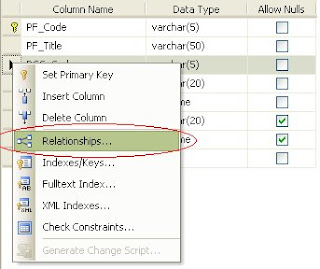
- Right click at which column attribute you want it to be a foreign key.
- Click Relationships.
- Click Add in the Foreign Key Relationships.
- Click the ... button.
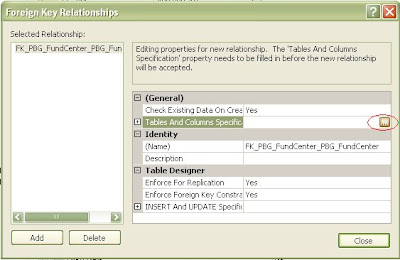
- Select the table and the attribute to be a foreign key.
Wednesday, November 21, 2007
Let's Talk about .. SQL Server 2005-Reporting Services
Because next year I will have to use the Reporting Services for the project at my office, thus I need to know about it. I read from some resources from the internet. And it's summarized that the Reporting Services is a server-based solution for creating management, and delivery of traditional, paper-based report, and interactive, web-based reports.The Full Reporting Write Cycle Support contains 4 steps:-
- Report Authoring: Report Developers create report by using Report Definition Report (RDL) design tools.
- Report Management: Administrators use SQL Server Management Studio to organize report and data sources, schedule report execution and delivery, and track reporting history.
- Report Delivery: Users view reports in Web-based format or in E-mail.
- Report Security: It implements a flexible, role-based security model to protect reports and reporting resources.
Ref. http://www.microsoft.com/sql/technologies/reporting/overview.mspx
Subscribe to:
Posts (Atom)